How to Start a WordPress Website Step by Step
How to Start a WordPress Website Step by Step
In today’s digital world, building a website has become an essential step for businesses and individuals who want to establish a strong online presence. Starting a WordPress website is not only about adding content but also about setting up the right structure, tools, and design from the beginning. A properly created website improves user experience, strengthens brand credibility, and supports long-term business success. Organizations across the USA, UK, Canada, Australia, France, Saudi Arabia, and the UAE (Dubai) recognize that following the correct steps when launching a WordPress website helps maintain professionalism, improve performance, and represent their brand effectively.
Each stage of creating a WordPress website—from choosing hosting and installing WordPress to selecting layouts and customizing features—plays an important role in how visitors experience your site. Skipping important setup steps can result in slow performance, navigation issues, and an unpolished appearance. On the other hand, following a structured step-by-step process ensures smoother functionality, better speed, and a more engaging browsing experience for users.
In this guide, we will walk through the essential steps required to start a WordPress website, covering key setup procedures, important features to consider, and practical guidance that helps businesses and beginners create reliable, high-performing websites that deliver professional results.
1. Choose a Flexible Design and Customize Your Website Easily
One of the first and most important steps when starting a WordPress website is selecting a design that allows flexibility and simple customization. Websites in different industries—such as online shops, corporate businesses, creative agencies, or consulting firms—require layouts that clearly represent their brand style and business goals.
WordPress offers a large selection of professional templates and customization tools that allow users to adjust layouts based on their specific needs. With the right design tools and settings, beginners can create attractive and functional websites that reflect their brand identity. Some important setup features to consider include:
- Adjustable layouts and color settings
- Easy-to-use design customization tools
- Compatibility with important plugins and features
- Mobile-friendly and modern page layouts
- Customizable headers, footers, and navigation menus
WordPress makes it possible to build professional-looking websites without needing advanced coding skills. For example, a creative agency such as FLIPSIDE CREATIVES can showcase photography, videography, and editing services using organized galleries, video displays, and portfolio sections that are simple to customize during the setup process.
2. Keep WordPress Updated for Better Performance and Stability
Another essential step when starting a WordPress website is keeping your system and design components updated. Regular updates help improve website performance, add new features, and ensure compatibility with the latest WordPress tools and technologies.
WordPress developers frequently release updates that improve usability, resolve technical issues, and enhance compatibility with modern web standards. Businesses serving audiences in the USA, UK, Canada, Australia, France, Saudi Arabia, and Dubai can maintain a high-quality website by following basic update and maintenance practices such as:
- Installing the latest WordPress updates
- Using designs and tools from trusted developers
- Removing unused themes or plugins
- Checking website performance regularly
- Choosing tools that receive ongoing updates and support
Following these steps helps keep websites running smoothly, visually appealing, and accessible to users around the world. By maintaining updated systems and tools, businesses can provide consistent performance while delivering a reliable and professional browsing experience for their visitors.
3. Manage Your Website Easily Using the WordPress Dashboard
WordPress is designed with simplicity in mind, making it easy for beginners to set up and manage their websites without needing technical or coding experience. When starting a WordPress website, users can quickly organize content and adjust settings using beginner-friendly tools.
Through a clear and easy-to-navigate dashboard, website owners can handle most setup and customization tasks from one place. This central control panel allows users to:
- Install and enable website designs and layouts
- Modify colors, fonts, and overall appearance
- Configure menus, headers, and footer sections
- Create and organize pages and content blocks
- Review changes before making them live on the website
This simple management system makes WordPress an ideal platform for businesses that want to build professional websites without complicated development steps. Regularly updating layouts and adjusting settings helps keep websites fresh, modern, and appealing to visitors.
For instance, businesses that serve customers across different countries can set up websites with multilingual features, responsive layouts, and flexible sections to display services, portfolios, or product information clearly. By using easy-to-manage tools and beginner-friendly features, companies can build visually consistent websites that attract users and encourage long-term engagement worldwide.

4. Start Your Website With a Budget-Friendly Setup
One of the major advantages of starting a WordPress website is that it can be done at a relatively low cost compared to fully custom-built websites. Instead of investing heavily in professional development from the beginning, businesses can launch high-quality websites using affordable tools and ready-made layouts.
WordPress provides many cost-effective options that allow beginners and small businesses to set up attractive and fully functional websites within a short time. Because WordPress is an open-source platform, users can access many reliable tools, templates, and resources either for free or at a minimal cost.
This affordable setup approach makes WordPress especially suitable for:
- Small and growing businesses
- New startups launching their first website
- Creative professionals and agencies
- Service-based companies offering specialized solutions
Businesses operating in countries such as Canada, Australia, the UK, and the UAE often choose WordPress because it allows them to build professional websites without requiring a large financial investment. By selecting practical tools and cost-effective solutions, even small organizations can create visually appealing websites that make a positive impression on visitors.
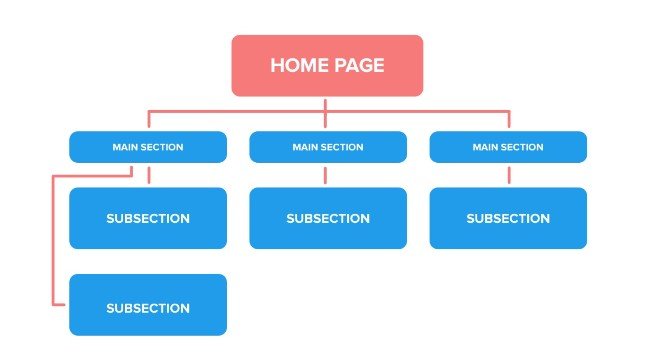
5. Build a Website That Can Grow With Your Business
When creating a WordPress website, it’s important to think about future growth and expansion. As a company develops, its website needs may also increase, requiring additional features, pages, and functionality. WordPress makes it possible to start with a simple setup and gradually expand the website as business requirements evolve.
A new website can begin with essential pages and later include more advanced features and improvements, such as:
- Multi-purpose layouts suitable for various industries
- Portfolio or showcase sections to display work or services
- Mobile-friendly designs that adjust to different screen sizes
- Expanded customization options for menus, layouts, and sections
- Integration with online stores or booking systems
Many growing businesses and popular websites rely on WordPress because it can support larger amounts of content, media, and visitors while maintaining strong performance and usability. Planning for scalability during the setup process ensures that your website can adapt to future demands, helping maintain a consistent and professional presence as your business expands into new markets.
6. Use Built-In Tools and Customization Features During Setup
Another important step when starting a WordPress website is making use of the built-in tools and customization features available within the platform. WordPress offers a wide selection of ready-to-use functions that help beginners and experienced users build professional websites without needing advanced technical knowledge.
These built-in tools allow website owners to quickly add important elements and adjust the appearance of their site with minimal effort. Some commonly used setup features include:
- Ready-made page templates that simplify the website creation process
- Adjustable header and footer sections
- Built-in areas for displaying portfolios, images, or media content
- Flexible menu structures for smooth navigation
- Support for online stores or booking features
- Mobile-friendly layouts that adapt to different screen sizes
- Options for adding multilingual content for global audiences
For instance, businesses serving customers in locations such as Saudi Arabia or Dubai can configure their websites with multilingual features, responsive layouts, and customizable content sections to clearly present services, portfolios, or product offerings.
Using these flexible tools during the setup process allows WordPress websites to meet the specific requirements of different industries. This approach helps businesses create visually appealing, easy-to-use platforms that provide a smooth browsing experience for visitors across various international markets.
7. Ensure Your Website is Mobile-Friendly and Responsive
With most users accessing websites via mobile devices, making your WordPress site responsive is a crucial step during setup. WordPress automatically provides responsive design options to ensure your website looks polished and functions well on all devices, including:
- Smartphones
- Tablets
- Laptops
- Desktop computers
Setting up a mobile-friendly site enhances the user experience, keeps visitors engaged, and guarantees consistent performance across devices. Responsive layouts also help businesses reach wider audiences while maintaining a professional online presence.
8. Utilize Built-In Tools and Keep Your Site Updated
WordPress comes with essential built-in features that simplify website setup, improve usability, and optimize performance. During the setup process, it’s important to select tools and features that enhance the overall look and functionality of your site. WordPress also regularly releases updates to fix issues, improve compatibility, and introduce new capabilities.
Key features to leverage during setup include:
- Pre-configured page layouts for easy site creation
- Customizable headers and footers
- Built-in sections for portfolios, galleries, or media
- Support for eCommerce or booking systems
- Compatibility with widely used plugins
Regularly updating your site ensures it remains secure, fully functional, and visually appealing, which is especially important for businesses presenting services, portfolios, or products online.
9. Access WordPress Learning Resources and Support
One of WordPress’s biggest advantages is its extensive support network. A global community of developers, designers, and experts continuously contributes tutorials, guides, and troubleshooting resources that simplify website setup and management.
During your WordPress setup, you can access:
- Step-by-step guides for website creation
- Assistance for customizing layouts and functionality
- Troubleshooting advice for technical issues
- Advanced solutions for design and content organization
No matter where your business operates—be it the USA, Canada, France, or Saudi Arabia—these resources make it easy for beginners to confidently build and maintain professional websites.
10. Integrate Your Site with Essential Business Tools
During setup, connecting your WordPress website with essential business tools can significantly improve its functionality and performance. These integrations allow you to manage operations, track metrics, and engage your audience efficiently.
Common integrations to consider when starting your website include:
- Analytics and performance monitoring platforms
- Email marketing tools
- CRM and lead management systems
- eCommerce or booking solutions
- Custom dashboards for monitoring activity
By integrating these tools from the start, your WordPress website can provide a professional, scalable, and feature-rich platform that grows alongside your business and serves international audiences effectively.
Final Thoughts
Selecting the right WordPress setup and configuration is one of the most important steps in creating a professional and fully functional website. A well-planned WordPress site stands out for its user-friendliness, cost-effectiveness, scalability, and extensive customization options.
Businesses and individuals around the USA, UK, Canada, Australia, France, Saudi Arabia, and Dubai use WordPress to build visually appealing, intuitive, and highly functional websites that attract visitors, highlight services or products, and strengthen their online brand presence.
Whether you are starting a new website from scratch, managing a creative portfolio, or expanding your business to international audiences, following a step-by-step WordPress setup ensures your site performs reliably, looks professional, and can grow as your online needs evolve.
By choosing the right themes, leveraging responsive layouts, keeping your site updated, and integrating essential plugins and tools, a properly configured WordPress website can become a core asset for establishing a strong online presence and boosting your website’s credibility.