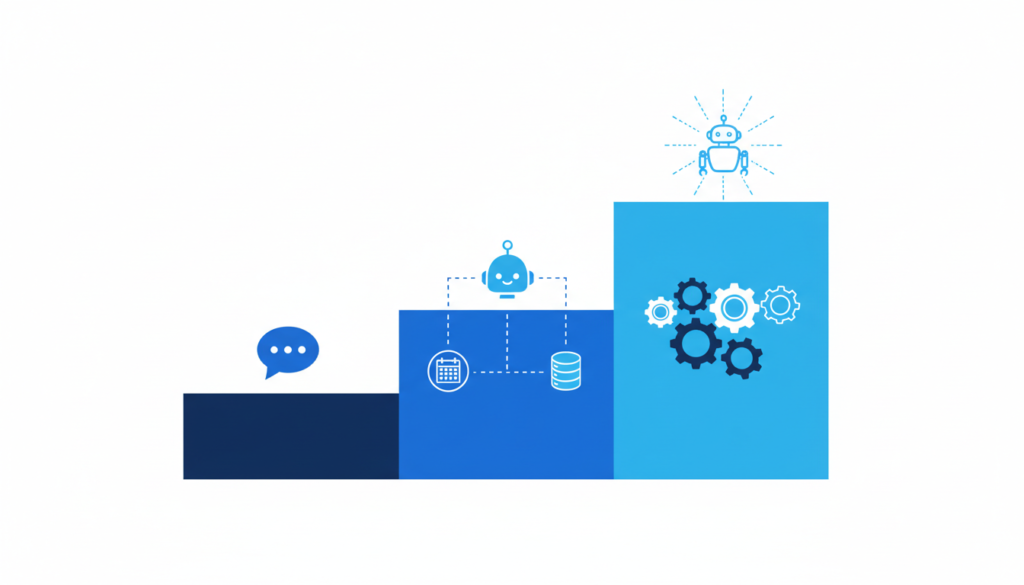
Most US small businesses pay $0 to $150 per month for an off-the-shelf AI chatbot, $1,500 to $8,000 for a custom chatbot set up on their own website and data, and $5,000 to $25,000+ for a fully integrated AI assistant that books appointments, updates a CRM and hands off to staff. That is the short answer to the AI chatbot cost for small business owners. The right number for you depends on what the bot has to do, how many conversations it handles and which tools it needs to connect to.
We build chatbots and AI automations for small businesses, and the same question comes up on almost every first call: “What will this actually cost me, every month, after launch?” This guide breaks it down in plain dollars, shows where the hidden costs hide and gives you a checklist to budget before you talk to any vendor.
In this guide
- What Drives AI Chatbot Cost for Small Business?
- AI Chatbot Pricing Models Explained
- Typical AI Chatbot Price Ranges in 2026
- Hidden Costs Most Business Owners Miss
- Is an AI Chatbot Worth It for a Small Business?
- How to Budget for Your Chatbot: A 7-Step Checklist
- Off-the-Shelf vs Custom AI Chatbot: Which Should You Choose?
- Tips From Real Chatbot Projects
- Frequently Asked Questions
What Drives AI Chatbot Cost for Small Business?
Two chatbots can look identical on a website and still be priced ten times apart. The difference is almost always in five areas:
- What it knows. A bot that answers from a 10-page FAQ is cheap. A bot that reads your price lists, service areas, policies and past emails needs more setup and testing.
- What it can do. Answering questions is one thing. Booking a time slot, checking an order status or creating a lead in your CRM requires integrations, and integrations are where most of the build budget goes.
- Where it lives. Website chat only is the cheapest. Adding SMS, WhatsApp, Facebook Messenger or Instagram DMs adds channel fees and more testing.
- How many conversations it handles. Most platforms charge by conversations, messages, “AI resolutions” or seats, so your traffic has a direct effect on the monthly bill.
- Who maintains it. Someone has to update answers when prices or policies change, review conversations and fix weak replies. That is either your time or a monthly retainer.
AI Chatbot Pricing Models Explained
Before you compare quotes, it helps to know how vendors charge. Most small-business chatbot tools use one of four models, and some mix two of them.
1. Flat monthly subscription
You pay a fixed plan price that includes a set number of conversations. This is the easiest to budget and the most common entry point for small businesses. Watch the conversation cap: once you go over it, you either upgrade or the bot stops answering.
2. Per seat (per agent)
Help desk platforms often charge per human agent who logs in, then add AI on top. This makes sense if you already have a support team. If you are a three-person office, paying per seat can be more than you need.
3. Per resolution or per outcome
Some vendors charge only when the AI fully resolves a conversation without a human. For example, Intercom charges 99 cents per resolution for its Fin AI agent, according to a Stripe case study. It is fair at low volume, but set a monthly cap for busy seasons.
4. Custom build plus monthly running costs
A developer or agency builds the bot around your business, connects it to your tools and hands it over. You pay a one-time build fee, then ongoing costs for the AI model usage (billed by the AI provider based on usage), hosting and optional maintenance. This is the route for businesses that need the bot to actually do things, not just talk.
Typical AI Chatbot Price Ranges in 2026
The table below shows typical ranges we see in the US market for small and medium businesses. They are not fixed quotes. Your final price depends on scope, integrations and conversation volume.
| Chatbot type | Best for | Typical setup cost | Typical monthly cost |
|---|---|---|---|
| DIY SaaS chatbot (template) | Simple FAQ answers on a small website | $0 (your own time) | $0–$150 |
| Professionally set up SaaS bot | Trained on your content, styled to your brand, lead capture | $500–$2,500 | $50–$300 |
| Custom AI chatbot on your data | Detailed answers from your documents, pricing and policies | $1,500–$8,000 | $50–$400 (AI usage + hosting) |
| AI assistant with integrations | Booking, CRM updates, order lookups, human handoff, multiple channels | $5,000–$25,000+ | $150–$1,000+ |
In our experience, most local service businesses land in the second or third row. A dental office or a law firm rarely needs a $25,000 system on day one. They need a bot that answers the 30 questions the front desk hears every week, captures the lead and books the consultation.
Hidden Costs Most Business Owners Miss
The sticker price is rarely the whole bill. These are the extra costs we see catch owners by surprise:
- Overage fees when you pass the conversation or message limit on your plan.
- AI add-ons. Some live chat tools sell the AI features as a separate monthly add-on on top of the base plan.
- Channel fees for SMS and WhatsApp messages, which are usually billed per message.
- Integration tools such as Zapier or Make if the bot connects to your CRM through a third-party connector.
- Content upkeep. Every time your prices, hours or services change, the bot’s knowledge must be updated or it will give wrong answers.
- Website speed. A heavy chat widget can slow your pages. If your site is already slow, read our guide on how to speed up a WordPress website before you add one.
Is an AI Chatbot Worth It for a Small Business?
Adoption is still early, which is an opportunity. According to the US Census Bureau, 19.8% of US businesses reported using AI in their operations in the survey period ending May 3, 2026, and use among firms with fewer than 20 employees did not change significantly between December 2025 and May 2026. In other words, a small business that answers customers instantly, at 10 p.m. on a Sunday, still stands out from most competitors.
To decide if it is worth it for you, do this quick math:
- Count how many website visitors or messages you get after hours or when staff are busy.
- Estimate how many of those people leave without contacting you.
- Multiply a realistic number of recovered leads by your average job or customer value.
- Compare that to the yearly cost of the chatbot (setup plus 12 months of fees).
If one or two extra booked jobs a month cover the bill, the chatbot usually pays for itself. If your website gets very little traffic, fix that first. A chatbot cannot convert visitors you do not have, and a site built to convert visitors into customers matters more than any widget.
How to Budget for Your Chatbot: A 7-Step Checklist
Use this checklist before you request quotes.
- Write down the top 20–30 questions customers ask by phone, email and chat.
- Pick one main goal: answer questions, capture leads, book appointments or support existing customers.
- List the tools it must connect to: calendar, CRM, booking software, ecommerce store, help desk.
- Choose your channels: website only, or also SMS, WhatsApp and social DMs.
- Estimate monthly conversations from your website analytics and current chat or call volume.
- Decide who maintains it and how often answers will be reviewed (we suggest weekly for the first month, then monthly).
- Set a 90-day test budget with clear success metrics, such as leads captured, bookings made and questions answered without staff.
Off-the-Shelf vs Custom AI Chatbot: Which Should You Choose?
This is the same trade-off as choosing between a template and a custom website, which we covered in WordPress vs custom website. Here is the short version for chatbots:
- Choose off-the-shelf if you mainly need FAQ answers and lead capture, you have low to medium traffic and you want to launch this week.
- Choose custom if the bot must book into your real calendar, look up orders or records, follow strict rules (healthcare, legal, finance) or match your brand voice closely.
- Start small, then grow. A smart path is to launch a well-trained SaaS bot first, prove it brings in leads, then invest in integrations once the numbers are clear.
Tips From Real Chatbot Projects
From our own chatbot and automation projects, these are the habits that keep costs down and results up:
- Always offer a human handoff. A clear “talk to a person” option protects your reputation when the bot is unsure.
- Ask for contact details at the right time, after the bot has been useful, not as the first message.
- Review real conversations every week in the first month. This is where you find the questions you forgot.
- Put the bot on a fast, mobile-friendly site. Most chats start on a phone, so a modern business website is the foundation.
Key Takeaways
- Typical AI chatbot cost for small business: $0–$150/month for DIY tools, $1,500–$8,000 for a custom bot, $5,000–$25,000+ for full integrations.
- Integrations, channels and conversation volume drive most of the price.
- Watch for overage fees, AI add-ons, per-message channel fees and upkeep time.
- Do the lead-value math first: one or two extra customers a month often covers the cost.
- Start with a focused 90-day test, then expand what works.
Frequently Asked Questions
How much does an AI chatbot cost per month?
For most small businesses, typical monthly costs range from free plans to around $150 for off-the-shelf tools, and roughly $50–$400 for a custom bot’s AI usage and hosting. Bots with many integrations and channels can cost $1,000 or more per month.
Can I build an AI chatbot for my website for free?
Yes, several platforms have free plans with a small number of conversations. They work for testing, but limits, branding and missing integrations usually push growing businesses to a paid plan.
How long does it take to set up a small business chatbot?
A template bot can go live in a day. A properly trained bot with lead capture usually takes one to two weeks. A custom bot with booking and CRM integrations typically takes three to eight weeks, including testing.
Will an AI chatbot replace my receptionist or support staff?
Usually not. A chatbot handles repeat questions and after-hours inquiries so your team can focus on complex conversations and paying customers. The best setups pass tricky chats to a person quickly.
Is it safe to connect a chatbot to my customer data?
It can be, if you limit what the bot can access, use providers with clear data policies and avoid collecting sensitive information in chat. Regulated businesses, such as healthcare practices, should confirm compliance requirements before launch.
Get a Clear Quote for Your AI Chatbot
Not sure which option fits your business? AK Softs Digital builds AI chatbots, booking automations and fast websites for small businesses, with 150+ Fiverr reviews, a 4.9 rating and experience working with teams in the UAE and France. Contact us for a free consultation and we will tell you honestly what you need, what it should cost and what you can skip.